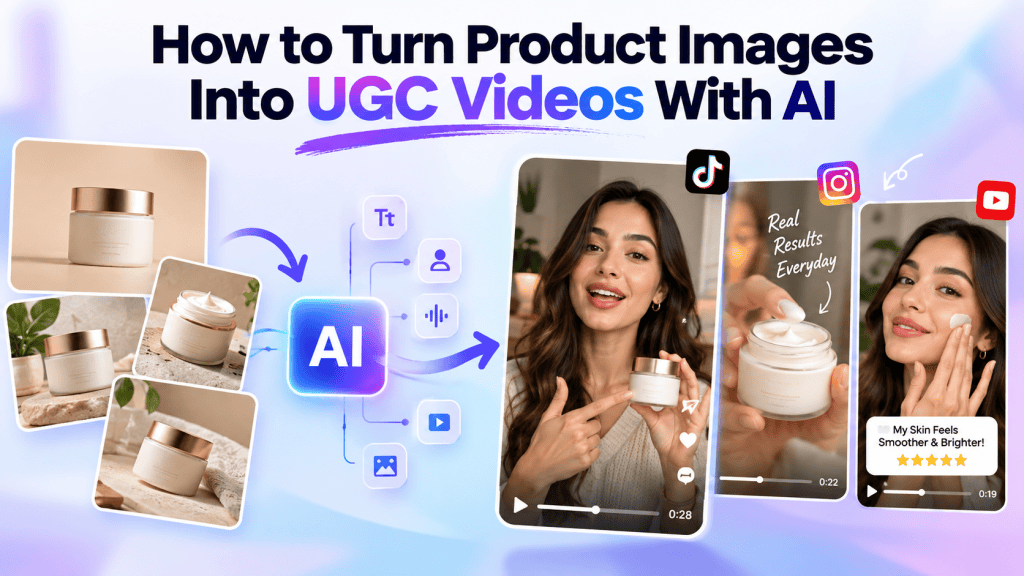
Product images are essential for eCommerce brands, but static visuals are no longer enough to capture attention across social media, landing pages, and digital advertising. Consumers increasingly expect dynamic, engaging, and authentic-looking content that demonstrates how a product fits into real-life situations.
This is where AI UGC Video for product shot workflows are becoming increasingly useful. Instead of manually filming products, hiring creators, setting up lighting, recording multiple takes, and editing videos, marketers can use AI to transform existing product images into engaging UGC-style videos.
With an AI-powered workflow, a few product photos can become short-form videos featuring realistic scenes, AI avatars, voiceovers, product demonstrations, hooks, captions, and calls to action.
In this guide, you’ll learn how to turn product images into UGC videos with AI, why brands are adopting this workflow, what makes an AI-generated UGC video effective, and how you can use these videos for social media and paid advertising.
What Is an AI UGC Video for Product Shots?
An AI UGC Video for product shot is a user-generated-content-style video created using product images, AI-generated visuals, avatars, voiceovers, scripts, and video-generation technology.
Traditional UGC usually requires a real creator to record themselves using or discussing a product. AI UGC simplifies the production process by using artificial intelligence to create a similar content format without requiring a complete traditional filming setup.
For example, imagine you sell a skincare product.
You may already have:
- Product packshots
- Lifestyle product images
- Product descriptions
- Product benefits
- Brand messaging
- Customer reviews
Instead of starting from scratch, an AI video tool can use these assets to create a short UGC-style video.
The final video could show an AI avatar introducing the product, display your product images, explain its benefits, add a conversational voiceover, and finish with a call to action.
This makes AI UGC videos particularly useful for eCommerce brands that already have a library of product photography but need more video content.
Why Turn Product Images Into UGC Videos?
Creating product videos traditionally can be expensive and time-consuming.
A brand may need to find a creator, send them the product, write a script, arrange filming, review footage, request revisions, and edit the final video.
AI changes this workflow.
Instead of treating every video as a separate production project, marketers can repurpose existing product images into multiple video concepts.
1. Repurpose Existing Product Assets
Most eCommerce brands already have high-quality product images.
Those images can become the foundation for multiple video formats.
For example, one product image can potentially be used in:
- Product introduction videos
- UGC-style testimonials
- Product demonstrations
- Problem-solution videos
- Social media ads
- Product comparison videos
- Tutorial videos
- Short-form promotional videos
This allows brands to get more value from their existing visual assets.
2. Create Videos Faster
Traditional video production requires multiple steps.
AI can reduce many of those steps by generating scripts, scenes, voiceovers, avatars, and edits within a single workflow.
Instead of spending days producing a single concept, marketers can create multiple variations much faster.
This is particularly useful when testing different hooks, messaging angles, and calls to action.
3. Produce More Creative Variations
Paid advertising often requires creative testing.
A single product may need several different versions of an advertisement.
For example:
Version A: Problem-focused hook
Version B: Product benefits
Version C: Customer testimonial
Version D: Before-and-after concept
Version E: Product demonstration
With AI, the same product images can become the foundation for multiple creative concepts.
4. Reduce Production Costs
Professional video production can involve costs for creators, studios, equipment, editors, locations, and post-production.
AI UGC workflows can reduce the amount of manual production required.
This doesn’t mean traditional UGC has become irrelevant. Real creators can still provide valuable authenticity. However, AI can complement creator content by helping brands produce additional variations quickly.
How to Turn Product Images Into UGC Videos With AI
Creating an AI UGC video from product images can be broken into several steps.
Step 1: Collect Your Product Images
Start with the product images you already have.
Ideally, collect different types of images, including:
- Front-facing product shots
- Side or back views
- Lifestyle photos
- Close-up product images
- Packaging photos
- Product-in-use images
- Feature-focused images
High-quality source images generally make it easier to create polished video content.
If your product only has one image, you can still create a video, but having multiple angles gives AI more visual material to work with.
Step 2: Define Your Target Audience
Before generating the video, determine who you want to reach.
A video aimed at skincare customers will have a different tone from a video promoting fitness equipment or SaaS software.
Think about:
- Age group
- Interests
- Main problems
- Buying motivations
- Preferred social platform
- Content style
- Common objections
Understanding your audience helps you create a UGC video that feels relevant rather than simply promotional.
Step 3: Choose a UGC Video Concept
Don’t immediately turn your product image into a generic promotional video.
Choose a specific concept first.
Some useful AI UGC concepts include:
Problem-Solution
Start by identifying a problem and introduce the product as the solution.
For example:
“I was struggling to find a moisturizer that didn’t leave my skin feeling greasy…”
The product is then introduced naturally.
Product Discovery
Create a video that feels like a creator discovering a product for the first time.
Product Review
Structure the video like a short customer review.
Tutorial
Show viewers how to use the product.
Listicle
Use a format such as:
“3 reasons I started using this product.”
Before-and-After
Use visual storytelling to demonstrate the difference the product can make, where claims are accurate and substantiated.
The right format depends on your product, audience, and marketing objective.
Step 4: Create an AI UGC Script
The script is one of the most important parts of an AI UGC video.
A strong script usually includes five components:
Hook → Problem → Product → Benefits → CTA
For example:
Hook:
“Looking for an easier way to keep your skin hydrated?”
Problem:
“I tried several products, but most felt heavy or disappeared within a few hours.”
Product:
“Then I started using this lightweight moisturizer.”
Benefits:
“It absorbs quickly and works well under makeup.”
CTA:
“Check it out and see if it’s right for your routine.”
Keep the script conversational.
UGC-style content should sound more like a person talking than a traditional advertisement.
Step 5: Upload Your Product Images
Once your script and concept are ready, upload your product images into an AI video creation platform.
Many modern AI video tools can analyze uploaded assets and use them to build scenes around the product.
Some platforms can also extract product information from a product URL, reducing the amount of manual input required.
The goal is to maintain visual consistency so the product looks recognizable throughout the video.
Step 6: Add an AI Avatar or Creator
One of the defining characteristics of UGC-style content is the presence of a person.
AI avatar technology allows brands to create videos featuring digital presenters who can deliver the script.
Depending on the platform, you may be able to select:
- Avatar appearance
- Gender
- Voice
- Language
- Accent
- Speaking style
- Background
- Video format
For social media ads, a natural conversational delivery generally works better than an overly formal presentation.
Step 7: Add AI Voiceovers
Voiceovers can make static product images feel much more dynamic.
AI voice technology allows you to generate narration without recording audio manually.
You can choose voices based on:
- Tone
- Age
- Accent
- Language
- Speaking speed
- Style
For UGC content, conversational voices are often appropriate because they can make the video feel closer to creator-style content.
Step 8: Build the Visual Scenes
Now transform the product images into a sequence of scenes.
For example:
Scene 1: Creator introduces the problem.
Scene 2: Product image appears.
Scene 3: Close-up product shot.
Scene 4: Product benefits are explained.
Scene 5: Lifestyle visual demonstrates usage.
Scene 6: CTA appears.
The key is to avoid simply placing the same product image on screen for the entire video.
Use movement, transitions, zooms, background changes, text overlays, and supporting visuals where appropriate.
Step 9: Add Captions and On-Screen Text
Many users watch social videos without sound.
Captions help viewers understand the message even when audio is muted.
You can also use short text overlays to emphasize important points.
For example:
“Lightweight Formula”
“Easy to Use”
“Made for Everyday Routines”
Keep on-screen text short and easy to read.
Avoid filling the screen with too much information.
Step 10: Add a Strong CTA
Every promotional UGC video should have a clear next step.
Depending on your objective, your CTA could encourage viewers to:
- Shop now
- Learn more
- Try the product
- Visit your website
- See the collection
- Start a free trial
- Discover more
The CTA should match the campaign objective rather than simply appearing as generic text.
How AI Product Shots Improve UGC Videos
Product shots are especially important because the product is the central visual asset.
AI can help transform basic product photography into more engaging visual scenes.
For example, a simple product image could potentially be presented in:
- A lifestyle environment
- A bathroom setting
- A kitchen scene
- A desk setup
- A fashion environment
- A social-media-style creator setup
- A product demonstration scene
This creates additional creative possibilities without requiring a new photoshoot for every concept.
The important thing is to preserve the product’s recognizable characteristics.
If AI changes the packaging, logo, shape, color, or important product details, the result can reduce trust.
Always review generated visuals before publishing.
How to Make AI UGC Videos Look Authentic
Generating a video is only the first step.
The bigger challenge is making the content feel natural.
Use Conversational Scripts
Avoid corporate language.
Instead of:
“Our innovative solution provides superior performance.”
Try:
“I’ve been using this for a few weeks, and here’s what I noticed.”
The second version sounds more natural for UGC-style content.
Keep Videos Focused
Don’t try to communicate every product feature in one short video.
Choose one primary message.
For example:
Video 1: Product benefits
Video 2: How to use it
Video 3: Problem-solution
Video 4: Product review
Video 5: Frequently asked question
This also gives you multiple creative assets for testing.
Use Natural Pacing
UGC content typically has a faster and more conversational rhythm than traditional corporate videos.
Use short sentences, visual changes, captions, and relevant product shots to maintain attention.
Show the Product Clearly
Even if the video features an AI avatar, the product should remain visually prominent.
The viewer should quickly understand what is being promoted.
Using AI UGC Videos for Paid Ads
One of the biggest applications of AI UGC Video for product shot content is paid advertising.
Platforms such as TikTok, Instagram, Facebook, and YouTube Shorts are highly visual environments where short-form video can be used to communicate product value quickly.
AI allows marketers to create multiple ad variations based on the same product assets.
For example, an eCommerce brand could create:
5 hooks × 3 scripts × 2 avatars × 2 CTAs = 60 creative variations
This doesn’t mean every variation will perform equally. Instead, it gives marketers more creative options to test.
You can compare different hooks, messaging angles, visuals, and CTAs using your advertising platform’s performance data.
AI UGC Videos for Social Media
AI-generated UGC videos can also support organic content strategies.
Brands can repurpose product photography into short-form videos for:
- Instagram Reels
- TikTok
- YouTube Shorts
The content should still be adapted to each platform.
For example, a TikTok video may benefit from a fast hook and trend-oriented presentation, while a LinkedIn video may require a more educational approach.
Creating platform-specific variations can make your content more relevant to each audience.
Common Mistakes to Avoid
While AI makes video production easier, there are several mistakes marketers should avoid.
Using Low-Quality Product Images
Poor source images can limit the quality of the final video.
Start with clear, high-resolution product assets whenever possible.
Making Every Video Look the Same
If every video uses the same avatar, hook, background, pacing, and script structure, your creative library can quickly become repetitive.
Experiment with different concepts.
Overusing AI Effects
Not every scene needs dramatic animation.
Too many effects can distract viewers from the product.
Use visual effects when they support the story.
Ignoring Product Accuracy
AI-generated visuals should be checked carefully.
Make sure product colors, packaging, labels, proportions, and other important details remain accurate.
Writing Long Scripts
Short-form videos need a focused message.
Remove unnecessary information and get to the main point quickly.
How Tagshop AI Can Help Create AI UGC Videos
Platforms such as Tagshop AI can simplify the process of turning product assets into AI-powered UGC content.
Instead of manually managing every part of production, marketers can use AI-powered features to accelerate ideation and video creation.
For example, an AI Video Agent can help users create videos through a conversational workflow. Rather than building everything manually, marketers can describe the type of video they want and use AI to assist with the creation process.
An Ad Clone workflow can also help marketers recreate the structure and creative direction of an existing advertisement while adapting the messaging to their own brand.
With URL-to-video, marketers can provide a product URL and use available product information and visual assets as inputs for video creation.
AI Twin technology can also help create personalized digital-presenter content based on a user’s provided image and voice.
These capabilities can be particularly useful for eCommerce marketers who need to produce multiple product videos without creating every asset from scratch.
Best Practices for Scaling AI UGC Video Production
Once you have created your first few videos, the next step is to build a repeatable workflow.
Start by creating a content matrix.
For example:
| Element | Variations |
| Hook | Problem, question, curiosity |
| Format | Review, tutorial, demo |
| Avatar | Creator A, Creator B |
| Product Visual | Packshot, lifestyle shot |
| CTA | Shop, Learn More, Try Now |
| Length | 15 sec, 30 sec, 45 sec |
This approach lets you systematically create multiple creative combinations.
You can then track performance metrics such as:
- Hook rate
- View-through rate
- Engagement
- Click-through rate
- Conversion rate
- Cost per click
- Cost per acquisition
- Return on ad spend
Use these insights to identify which creative approaches deserve additional testing.
Final Thoughts
Turning product images into UGC videos with AI gives eCommerce brands a practical way to expand their video content without relying entirely on traditional production.
With the right product images, script, avatar, voiceover, visual scenes, captions, and CTA, a simple product photo can become a short-form marketing asset designed for social media, websites, and paid advertising.
The key is not simply to generate more videos. The goal is to create relevant, authentic-looking, product-focused content that communicates a clear message.
By combining strong product photography with AI video generation, brands can build a scalable workflow for producing different creative concepts, testing messaging, and adapting content across multiple channels.
As AI video technology continues to evolve, the ability to transform static product assets into dynamic UGC-style content can become an important part of modern eCommerce content production.
If your brand already has a library of product images, AI UGC Video for product shot workflows can help you turn those existing assets into more engaging video content while reducing the manual effort involved in traditional video production.


Leave a comment