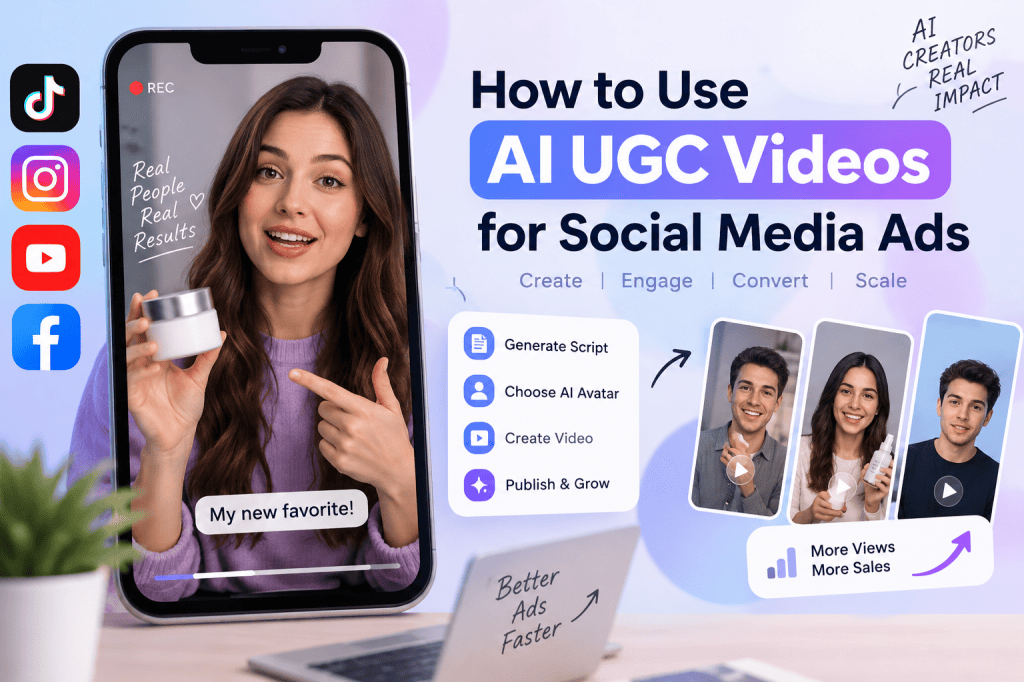
Social media advertising has become increasingly video-driven. Brands need creative content that can capture attention quickly, communicate product benefits clearly, and feel natural enough to fit into a user’s feed. This is one reason AI UGC Video for social media has become an increasingly useful approach for marketers, ecommerce brands, agencies, and creators.
AI-generated user-generated content (UGC) videos can simulate the style of traditional creator content without requiring a brand to organize a full production process for every campaign. Marketers can create product demonstrations, testimonials, unboxing-style videos, problem-solution videos, and short-form promotional creatives using AI avatars, synthetic voices, scripts, product images, and other creative assets.
The key is not simply generating an AI video. The goal is to create content that matches the platform, audience, product, and advertising objective.
In this guide, you’ll learn what AI UGC Video for social media means, how it works, how to create effective AI UGC ads, which platforms you can use them on, common mistakes to avoid, and how to improve performance through testing.
What Is AI UGC Video for Social Media?
AI UGC Video for social media refers to short-form videos created with artificial intelligence that reproduce the familiar style of user-generated content.
Traditional UGC typically involves a real customer or creator talking about a product, demonstrating how it works, sharing an experience, or recommending it. AI UGC uses technologies such as AI avatars, text-to-speech, generative video, automated scripting, and image generation to produce similar content.
For example, an ecommerce brand selling skincare products could create a 20-second video featuring an AI avatar explaining:
“I started using this product because my skin felt extremely dry. After adding it to my routine, it became much easier to keep my skin hydrated.”
The video can then show the product, supporting visuals, captions, and a call to action.
This format is particularly useful for social media because it can be produced quickly and adapted into multiple creative variations.
Why Are AI UGC Videos Useful for Social Media Ads?
Social media users scroll through large amounts of content every day. Traditional polished advertisements can sometimes feel noticeably different from the organic content surrounding them.
UGC-style advertising attempts to reduce that gap.
AI UGC videos can help brands create social-first advertising creatives that resemble short-form creator content. Instead of relying on one video, marketers can generate multiple hooks, scripts, presenters, product angles, and calls to action.
Another major advantage is creative testing. A brand could create five different opening hooks for the same product and test them against different audiences.
For example:
Hook 1: “I didn’t expect this to work this well.”
Hook 2: “If you’re struggling with this problem, watch this.”
Hook 3: “Three things I like about this product.”
Hook 4: “Here’s what happened after I tried it.”
Hook 5: “I wish I had discovered this sooner.”
The core product remains the same, but the creative angle changes.
How AI UGC Videos Work
Creating an AI UGC video generally involves several stages.
First, the marketer defines the campaign objective. The objective could be increasing product awareness, generating website traffic, promoting a discount, collecting leads, or driving purchases.
Next, the product information is converted into a script. AI tools can help generate multiple versions based on the target audience and platform.
The next step is selecting an AI avatar or creator-style presentation. Depending on the tool, marketers may choose different presenters, voices, languages, backgrounds, and presentation styles.
Product images, screenshots, demonstrations, or AI-generated visuals can then be incorporated into the video.
Finally, captions, transitions, music, branding, and a call to action can be added before exporting the creative.
The complete workflow can look like this:
Product → Script → AI Avatar/Voice → Product Visuals → Editing → Captions → CTA → Social Media Ad
Step 1: Define Your Social Media Advertising Goal
Before creating an AI UGC video, determine what you want the video to accomplish.
Different goals require different creative approaches.
If your objective is brand awareness, focus on a strong hook and a simple explanation of the product.
If your objective is engagement, create content that encourages viewers to watch, comment, or share.
For website traffic, explain the value proposition and finish with a clear reason to click.
For conversions, focus on product benefits, objections, social proof, demonstrations, offers, and a direct call to action.
For example, an awareness video might say:
“Looking for an easier way to create product videos?”
A conversion-focused video might say:
“Create your next UGC-style product video in minutes and start testing new ad creatives today.”
Your objective should influence the script, visuals, CTA, and video length.
Step 2: Understand Your Target Audience
The same AI UGC Video for social media will not work equally well for every audience.
Consider who you’re trying to reach.
Ask:
- What problem does the audience have?
- What language do they use?
- What objections might they have?
- What type of content do they normally watch?
- Which social platform do they use?
- What would make them stop scrolling?
- What benefit matters most to them?
For example, a fitness brand targeting younger consumers may use fast-paced vertical videos, energetic hooks, captions, and short demonstrations.
A B2B SaaS company may use a more conversational AI presenter explaining a specific workflow or business problem.
Audience understanding should come before video production.
Step 3: Write a Short, Conversational Script
One of the biggest mistakes marketers make with AI UGC is writing scripts that sound like traditional advertisements.
UGC-style content generally works better when the language feels conversational.
Instead of:
“Our revolutionary skincare solution provides advanced hydration technology.”
Consider:
“My skin gets really dry, especially during winter, so I started looking for something that could actually keep it hydrated.”
The second version sounds more like a personal recommendation.
A simple AI UGC script structure can be:
Hook → Problem → Product Introduction → Benefits → Proof/Demonstration → CTA
For a 20–30 second video, you don’t need to explain everything about the product.
Focus on one core message.
Step 4: Create Multiple Hooks
The first few seconds are extremely important for short-form advertising.
Instead of creating one video and hoping it performs well, create multiple opening hooks.
For example:
Curiosity hook:
“I didn’t think this would make such a big difference.”
Problem-based hook:
“If creating social media videos takes you hours, try this.”
Benefit hook:
“Here’s how I create UGC-style videos without filming myself.”
Question hook:
“Want to create more video ads without hiring a new creator every time?”
Demonstration hook:
“Let me show you how this works.”
The rest of the video can remain similar while the opening changes.
This makes AI particularly useful for creative experimentation.
Step 5: Choose the Right AI Avatar or Voice
An AI avatar should match your audience and brand.
For example, a professional software company may choose a presenter with a clean, professional appearance, while a beauty or lifestyle brand may prefer a more casual creator-style presentation.
Voice selection matters as well.
The voice should sound natural and match the tone of the content. A highly formal voice may feel inappropriate for an informal TikTok-style advertisement.
Depending on your audience, you can also create localized versions using different languages and accents.
However, brands should avoid presenting synthetic people as real customers or creators when doing so would mislead viewers. Transparency and truthful product claims remain important.
Step 6: Add Real Product Visuals
AI UGC becomes more useful when the viewer can clearly see what is being promoted.
Don’t rely only on an AI avatar talking to the camera.
Add:
- Product images
- Screen recordings
- Product demonstrations
- Before-and-after visuals where appropriate and substantiated
- Website screenshots
- Packaging shots
- Feature demonstrations
- Text overlays
- Relevant lifestyle footage
For ecommerce brands, product visuals are particularly important because viewers need to understand what they are being asked to purchase.
An AI presenter can introduce the product, while supporting visuals demonstrate the actual product.
Step 7: Optimize Videos for Each Social Platform
A common mistake is creating one generic video and publishing exactly the same version everywhere.
Different platforms have different user behaviors and creative conventions.
TikTok
TikTok advertising generally benefits from fast pacing, strong hooks, vertical framing, captions, and creator-style storytelling.
An AI UGC video for TikTok can focus on a single problem, product benefit, or demonstration.
Instagram Reels
Instagram Reels can work well with visually strong product demonstrations, lifestyle content, tutorials, testimonials, and creator-style storytelling.
Keep branding visible without making the content feel like a traditional corporate commercial.
YouTube Shorts
Shorts can be used for educational, entertaining, product-focused, and problem-solution content.
The opening should quickly communicate why the viewer should continue watching.
Facebook supports a broad range of audiences, so the creative approach should depend on the specific demographic you’re targeting.
For some audiences, clear product explanations and benefit-driven messaging may be more effective than extremely fast editing.
The core principle is simple: create platform-native content instead of simply resizing the same advertisement.
Step 8: Add Captions and On-Screen Text
Many social media users watch videos without sound.
Captions help communicate the message even when audio is muted.
Use short, readable text instead of putting the entire script on screen.
For example:
Create UGC videos faster
No filming required
Turn your product into social-ready creatives
Text overlays should support the spoken message rather than compete with it.
Keep important information within safe areas so it isn’t covered by platform interface elements.
Step 9: Include a Strong Call to Action
Every performance-focused AI UGC ad should have a clear next step.
Depending on your objective, the CTA could be:
- Shop now
- Learn more
- Try it free
- Start creating
- Get the offer
- Visit the website
- Download the app
- See how it works
Avoid using multiple competing CTAs in a short video.
Choose one primary action.
Step 10: Test Different AI UGC Creatives
One of the biggest benefits of AI video creation is the ability to produce variations.
Instead of testing only one video, test multiple creative variables.
You can change:
Hook: Different opening statements.
Avatar: Different presenters.
Voice: Different speaking styles.
Script: Different messaging angles.
Visuals: Product shots versus demonstrations.
CTA: Different conversion messages.
Length: Short versus slightly longer versions.
For example, you could create 10 versions of one product advertisement:
- 3 different hooks
- 2 avatars
- 2 CTAs
- 3 visual approaches
You can then evaluate which combinations generate stronger results.
AI UGC Video for Social Media: Best Practices
Creating AI-generated content is relatively easy. Creating effective advertising content requires more strategy.
Make the First Seconds Count
Lead with the most interesting part of the message.
Avoid long introductions such as:
“Hello everyone, today we’re going to talk about…”
Instead, start with the problem, result, question, or surprising statement.
Keep One Main Message
Trying to explain every feature in one short video can make the content difficult to follow.
Choose one primary benefit.
You can create separate videos for other features.
Make It Feel Native
The goal of UGC-style advertising is to fit naturally into the platform environment.
Use conversational language, vertical framing, captions, natural pacing, and relevant visual storytelling.
Show Instead of Only Telling
If your product has a visual benefit, demonstrate it.
A SaaS company can show the dashboard.
An ecommerce brand can show the product.
A mobile app can show the interface.
Demonstration often makes an AI UGC ad more informative.
Avoid Unsupported Claims
AI makes it easy to generate persuasive scripts, but brands should verify factual claims before publishing advertisements.
Don’t use fabricated testimonials, fake customer experiences, misleading before-and-after results, or unsupported performance claims.
Common Mistakes to Avoid
Making the Video Too Perfect
If every AI UGC video looks like a polished commercial, it may lose the creator-style feeling marketers are trying to achieve.
Natural pacing and conversational storytelling can help.
Using Generic Scripts
A generic script such as “This amazing product is perfect for everyone” doesn’t communicate a specific reason to care.
Make the message audience-specific.
Overusing AI Effects
AI-generated transitions and visual effects can become distracting.
Use effects when they improve understanding or attention, not simply because they’re available.
Ignoring Product Context
An AI avatar talking for 30 seconds without showing the product may not provide enough information.
Use relevant product visuals throughout the video.
Creating Only One Version
Advertising performance can vary significantly between creatives.
Build a testing system rather than relying on one video.
How Brands Can Scale AI UGC Ads
The real advantage of AI UGC isn’t simply speed. It is the ability to build a repeatable creative production workflow.
A brand can create a content library containing:
- Multiple hooks
- Product benefits
- Customer pain points
- Objection-handling scripts
- Different avatars
- Different voices
- Product demonstrations
- CTAs
- Seasonal messages
These components can then be combined into new creative variations.
For example, a fashion ecommerce brand could create separate videos around:
New arrivals
Limited-time offers
Product styling
Customer problems
Product features
Seasonal collections
Gift recommendations
This approach turns AI UGC into an ongoing creative testing system rather than a one-time content experiment.
How Tagshop AI Can Help Create AI UGC Videos
Platforms such as Tagshop AI can simplify the process of creating AI-powered advertising content by bringing multiple creative workflows into one environment.
Marketers can use AI-powered tools to develop scripts, generate creator-style videos, work with AI avatars and voices, and transform product information into video content.
For ecommerce brands, URL-to-video workflows can also help turn product information into social-ready video concepts. Instead of manually collecting every product detail, marketers can use product information as the starting point for generating creative content.
The broader advantage is speed: teams can move from an idea to multiple video concepts without organizing a traditional filming session for every variation.
Measuring the Performance of AI UGC Social Media Ads
After publishing your videos, measure performance using metrics that match your campaign objective.
Important metrics can include:
Hook rate: How effectively the opening captures attention.
Video retention: How long viewers continue watching.
Engagement: Likes, comments, shares, and saves.
Click-through rate: How effectively the ad generates clicks.
Conversion rate: How many users complete the desired action.
Cost per acquisition: How efficiently the campaign generates customers.
Return on ad spend: Revenue generated relative to advertising spend.
Don’t judge an AI UGC ad based on one metric alone.
For example, a video may receive high engagement but produce few conversions. Another may receive fewer interactions but generate significantly more purchases.
The campaign objective should determine which metrics matter most.
Future of AI UGC Video for Social Media
AI-generated UGC is likely to become increasingly integrated into social media creative workflows.
As AI video generation improves, marketers will have more options for producing localized, personalized, and platform-specific advertising content.
Instead of creating one advertisement for an entire audience, brands may be able to generate different creative variations based on audience interests, products, languages, and campaign objectives.
However, authenticity will remain important.
AI can help create the structure and presentation of UGC-style content, but strong advertising still depends on genuine product value, useful messaging, relevant storytelling, and accurate claims.
The brands that combine AI production speed with strong creative strategy are better positioned to build scalable social advertising workflows.
Final Thoughts
Using AI UGC Video for social media can help brands produce short-form advertising creatives faster and experiment with more ideas without depending entirely on traditional video production.
The most effective workflow starts with understanding the audience and campaign objective. From there, brands can develop conversational scripts, test different hooks, select suitable AI presenters, incorporate real product visuals, optimize videos for individual platforms, and measure performance.
The important thing is to treat AI UGC as a creative testing system rather than simply an automated video generator.
Start with one product and one audience. Create several hooks and messaging angles. Test the videos across your chosen social platforms, analyze the results, and use those insights to create the next generation of creatives.
With the right strategy, AI UGC can become a scalable part of your social media advertising workflow.
FAQs
What is AI UGC Video for social media?
AI UGC Video for social media is video content created using artificial intelligence to replicate the conversational, creator-style format commonly associated with user-generated content. It can include AI avatars, synthetic voices, AI-generated scripts, product visuals, captions, and other creative elements.
Can AI UGC videos be used for paid social media ads?
Yes. AI UGC-style videos can be used as creative assets for paid social campaigns, provided the content follows the applicable advertising rules, platform policies, disclosure requirements, and consumer-protection standards.
Which social platforms can use AI UGC videos?
AI UGC videos can be adapted for platforms such as TikTok, Instagram, Facebook, and YouTube Shorts. The creative should be optimized for the format and audience of each platform.
How long should an AI UGC social media ad be?
There is no universal ideal length. The video should be long enough to communicate its core message while maintaining viewer attention. Short, focused videos are often easier to test and iterate.
How can I make AI UGC videos look authentic?
Use conversational scripts, natural pacing, relevant product visuals, appropriate AI presenters, clear storytelling, and platform-native formatting. Avoid making unsupported claims or presenting fictional AI-generated experiences as genuine customer testimonials.
Can AI UGC videos replace real creators?
AI UGC can complement traditional creator content, but it doesn’t necessarily replace real creators. Real creators can provide genuine experiences, opinions, and relationships with their audiences, while AI can help brands produce scalable creative variations.
What makes an AI UGC ad effective?
A strong hook, relevant audience messaging, clear product value, authentic-feeling storytelling, useful visuals, and a specific call to action are important components. Continuous creative testing is also essential for understanding what works for a particular audience.


Leave a comment