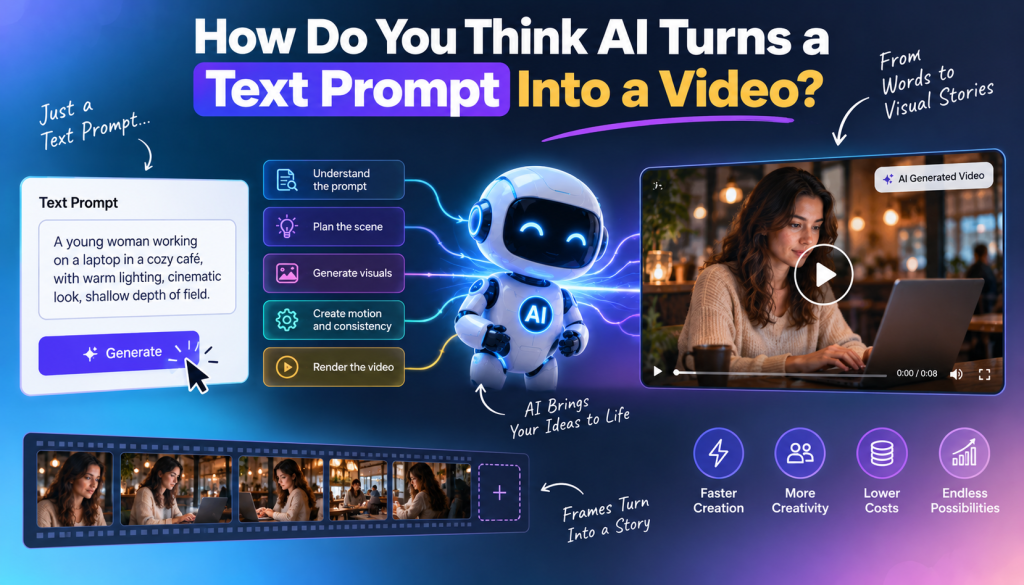
Have you ever typed a simple sentence into an AI tool and wondered how it can turn those words into an actual video?
You might write something as simple as:
“A young entrepreneur works late at night in a modern office while city lights shine through the window.”
A few moments later, AI can generate a video showing a person, an office, lighting, movement, and even cinematic camera motion.
But how does that happen?
The process behind AI text-to-video generation is much more complicated than simply converting words into pictures. AI models need to understand the meaning of a prompt, identify objects and actions, construct visual information, predict how those elements should move over time, and generate a sequence of frames that look coherent.
In this article, we’ll explore how AI turns a text prompt into a video, what happens behind the scenes, why AI-generated videos sometimes look strange, and where text-to-video technology is heading.
What Is Text-to-Video AI?
Text-to-video AI is a form of generative artificial intelligence that creates video content based primarily on written instructions.
Instead of manually recording footage, you provide a text prompt describing what you want.
For example:
“A golden retriever running through a sunny park in slow motion, cinematic camera movement.”
The AI interprets the description and generates a sequence of visual frames representing the requested scene.
Depending on the model, you may also be able to control elements such as:
- Characters
- Locations
- Objects
- Camera angles
- Lighting
- Movement
- Visual style
- Duration
- Aspect ratio
- Mood
- Audio
This makes AI video generation useful for creators, marketers, educators, advertisers, and businesses that need video content quickly.
So, How Does AI Turn Text Into Video?
At a high level, the process looks like this:
Text prompt → Language understanding → Scene interpretation → Visual generation → Motion generation → Frame consistency → Video output
Each stage plays an important role.
Let’s break it down.
1. AI First Understands Your Text Prompt
The first step is understanding what you’ve written.
An AI video model doesn’t interpret your prompt exactly like a human does. Instead, it processes the words and identifies relationships between concepts.
Consider this prompt:
“A woman wearing a red jacket walks through a rainy Tokyo street at night.”
The AI needs to identify several components:
- Person: woman
- Clothing: red jacket
- Action: walking
- Environment: Tokyo street
- Weather: rain
- Time: night
It also needs to understand how these elements relate to one another.
The red jacket belongs to the woman.
The rain affects the environment.
The woman is walking through the street.
The scene takes place at night.
This semantic understanding is one of the foundations of text-to-video AI.
2. The Prompt Is Converted Into a Machine-Readable Representation
After interpreting the text, the AI needs to translate the meaning into a representation it can use to generate visual content.
Modern generative AI systems learn relationships between language and visual concepts from enormous amounts of training data.
During training, models learn that words and phrases such as:
- “sunset”
- “ocean”
- “cinematic”
- “running”
- “smiling”
- “close-up”
- “robot”
- “modern office”
are associated with particular visual patterns.
The model can then use these learned relationships when generating new content.
This is why you can describe a scene that the model has never seen exactly before and still receive a meaningful visual result.
3. AI Builds a Concept of the Scene
The next challenge is turning language into a visual scene.
Suppose your prompt says:
“A futuristic city with flying cars moving between skyscrapers.”
The AI needs to decide:
Where are the skyscrapers?
Where are the flying cars?
What does the street look like?
How should the buildings appear?
How should the cars move?
What should the lighting look like?
The model isn’t simply searching for an existing video of a futuristic city.
Instead, it generates visual content based on patterns it learned during training.
This is what makes generative AI different from a traditional stock-video search engine.
4. The AI Generates Visual Information
Once the model understands the requested scene, it begins generating the visual content.
Many modern generative models work with a compressed representation of visual information rather than directly manipulating every individual pixel from the beginning.
You can think of this as a visual space where the AI can represent important information about the image or video.
The model progressively transforms an initial noisy representation into something that resembles the requested scene.
This is closely related to the principles behind diffusion-based generative models.
In simplified terms:
Noise → AI applies learned patterns → recognizable visual structure → detailed frame
For video generation, however, there’s another major problem.
The model can’t generate every frame independently.
If it did, the character could look completely different from one frame to the next.
That’s why temporal consistency is so important.
5. AI Has to Understand Time and Motion
Creating one image is significantly easier than creating a video.
An image only needs to make sense at one moment.
A video contains many moments.
If a person is walking across a room, the AI needs to understand how their body should change from frame to frame.
For example:
Frame 1: Person begins walking.
Frame 2: Leg moves forward.
Frame 3: Body shifts.
Frame 4: Other leg moves forward.
The movement needs to look continuous.
This is known as temporal consistency.
The AI therefore needs to model not just what things look like but also how they change over time.
6. Maintaining Character Consistency
One of the hardest problems in AI video generation is keeping the same character consistent.
Imagine your prompt requests:
“A woman with long brown hair wearing a blue jacket walks through a city.”
The AI might generate a convincing first frame.
But if the character’s appearance changes dramatically halfway through the video, the result becomes distracting.
Good AI video generation therefore requires the model to maintain consistency in:
- Face
- Hair
- Clothing
- Body structure
- Accessories
- Skin appearance
- Position
- Environment
The better the model becomes at understanding these relationships, the more realistic AI-generated video becomes.
7. Camera Movement Is Also Generated
AI doesn’t only generate the subject.
It can also generate camera behavior.
For example, your prompt might request:
“A cinematic tracking shot following a cyclist through a mountain road.”
The AI needs to understand that the camera should move with the cyclist.
Other camera concepts can include:
- Close-up
- Wide shot
- Tracking shot
- Dolly movement
- Pan
- Tilt
- Aerial shot
- Slow zoom
- Handheld movement
This is another reason prompt structure matters.
Adding camera instructions can influence how the final video feels.
8. AI Generates a Sequence of Frames
A video is essentially a sequence of images displayed rapidly one after another.
The AI must therefore generate a coherent sequence rather than one isolated image.
This means it needs to maintain relationships across time.
For example:
If a car appears on the left side of the frame in one moment, it shouldn’t suddenly teleport to the opposite side without a logical movement.
If a person holds a cup, the cup shouldn’t randomly disappear.
If a character walks forward, their body and environment should respond naturally.
These seemingly simple requirements are computationally difficult.
9. Why AI Videos Sometimes Look Strange
You’ve probably seen AI-generated videos where something looks almost right—but not quite.
A person’s hands may change.
A face might briefly distort.
An object may disappear.
A character’s clothing may transform.
The physics may look unrealistic.
Why does this happen?
Because the model is predicting what the next visual information should look like based on patterns learned during training.
It doesn’t understand the physical world exactly like humans do.
It has learned statistical relationships between visual concepts, motion, and language.
This means it can produce extremely convincing results, but it can also make mistakes when a scene involves complex interactions.
10. Prompt Quality Matters
The quality of your prompt can influence the quality and relevance of the generated video.
A vague prompt gives the AI more room to make decisions.
For example:
“Create a video about a businessman.”
This leaves many unanswered questions.
Where is he?
What is he doing?
What does he look like?
What’s the mood?
What kind of camera shot should be used?
A more detailed prompt might be:
“A confident young businessman in a dark suit presenting a new technology product inside a modern glass office, cinematic lighting, medium camera shot, subtle camera movement, professional corporate style.”
Now the AI has more information to work with.
However, longer prompts aren’t automatically better.
The goal is to provide clear and useful direction, not unnecessary words.
Text-to-Video vs Traditional Video Production
The biggest advantage of AI video generation is speed.
Traditional production can involve:
Script → Location → Camera → Actors → Lighting → Recording → Editing → Post-production
Text-to-video can reduce the initial production process to:
Prompt → Generate → Review → Edit
This doesn’t mean AI completely replaces traditional video production.
For high-end productions, human cinematographers, actors, directors, and editors still provide creative control that AI can’t fully replicate.
But for social media content, concept visualization, advertisements, educational videos, and rapid experimentation, AI can significantly reduce production time.
AI Video Generation for Marketing
One of the most interesting applications is marketing.
Businesses can use AI-generated video for:
- Product advertisements
- Social media campaigns
- YouTube Shorts
- Instagram Reels
- AI UGC videos
- Product demonstrations
- Explainer videos
- Promotional content
- Creative testing
For example, a marketer could create multiple versions of an advertisement with different hooks, characters, settings, or visual styles.
Instead of spending days producing one concept, they can experiment with multiple concepts much faster.
This makes AI video generation particularly useful for creative testing.
Why AI Video Generation Is Getting Better
AI video models continue to improve in several areas.
These include:
Better realism
Characters and environments are becoming more convincing.
Better motion
Models are improving at generating realistic movement.
Better consistency
Characters and objects can remain more stable throughout a clip.
Better prompt understanding
AI is becoming better at following detailed instructions.
Longer videos
Models are gradually becoming capable of generating longer and more coherent sequences.
Better audio integration
Video generation is increasingly being combined with speech, sound effects, and music.
The long-term goal is not simply to generate short clips.
It’s to give creators greater control over entire video productions.
How to Write Better Text-to-Video Prompts
If you’re experimenting with AI video generation, start with a simple structure:
Subject + Action + Environment + Camera + Lighting + Style
For example:
Subject: Young woman
Action: Demonstrating a skincare product
Environment: Modern bedroom
Camera: Medium close-up
Lighting: Soft natural morning light
Style: Authentic social media advertisement
Combined:
“A young woman demonstrates a skincare product in a modern bedroom, speaking directly to the camera in an authentic UGC style. Medium close-up, soft natural morning lighting, realistic facial expressions, subtle handheld camera movement.”
This gives the AI clear creative direction without making the prompt unnecessarily complicated.
The Future of Text-to-Video AI
The future of AI video generation will likely focus on greater control and consistency.
Creators won’t just want to say:
“Make a video of a person walking.”
They’ll want to control exactly who the person is, how they move, what they say, where they are, how the camera behaves, and how the scene connects to the next one.
As models become better at understanding context, physics, characters, audio, and storytelling, AI video generation could become more like working with a virtual production team.
The creator provides the creative direction.
AI handles much of the production.
Human judgment remains responsible for the final result.
Final Thoughts
So, how does AI turn a text prompt into a video?
It starts by interpreting your words and identifying the concepts, objects, actions, environment, and style you’re describing.
The model then transforms that information into visual representations, generates the scene, predicts how objects and characters should move, maintains consistency between frames, and produces a sequence that becomes a video.
The process may appear simple from the user’s perspective:
Type prompt → Click generate → Watch video
But behind that simple interface is a complex combination of language understanding, visual generation, motion prediction, temporal consistency, and learned patterns.
And that’s what makes text-to-video AI so powerful.
The technology is still evolving, but the direction is clear: turning an idea into a video is becoming faster, more accessible, and less dependent on traditional production equipment.
The biggest opportunity isn’t simply generating more videos.
It’s using AI to turn better ideas into better content.
Frequently Asked Questions About AI Text-to-Video
What is AI text-to-video generation?
AI text-to-video generation is a technology that uses artificial intelligence to create video content from written prompts. The AI interprets the description and generates visual scenes, movement, and other video elements based on the instructions.
How does AI understand a video prompt?
AI models learn relationships between language and visual concepts during training. When you enter a prompt, the model identifies important elements such as subjects, actions, environments, camera instructions, and visual styles before generating the requested content.
Can AI create a video from just text?
Yes. Modern text-to-video models can generate video from written descriptions. Depending on the platform and model, you may also be able to combine text with images, reference videos, audio, or other inputs.
Why do AI-generated videos sometimes have errors?
AI-generated videos can contain visual inconsistencies because the model has to predict complex objects and movements across multiple frames. Hands, faces, text, physics, and object interactions can sometimes be particularly challenging.
Can AI-generated videos look realistic?
Yes. Modern AI video models can create highly realistic scenes, but realism varies depending on the model, prompt, subject, motion, and complexity of the scene.
What makes a good AI video prompt?
A good prompt clearly describes the subject, action, environment, camera movement, lighting, and visual style. Specific and consistent instructions generally give the model better creative direction.
Can AI create YouTube Shorts from text?
Yes. AI video generators can be used to create short-form videos from text prompts. Creators can generate scenes, add narration and captions, and format the final content for platforms such as YouTube Shorts, Instagram Reels, and TikTok.
Is AI video generation replacing traditional video production?
AI is changing video production, but it isn’t completely replacing traditional filmmaking. Instead, it provides a faster way to create certain types of content, experiment with ideas, produce social media videos, and reduce repetitive production tasks.
What is the difference between text-to-video and image-to-video?
Text-to-video generates video primarily from a written description. Image-to-video starts with an existing image and uses AI to animate or transform it into a video sequence.
What is the biggest challenge with AI video generation?
One of the biggest challenges is maintaining control and consistency. Creating a visually impressive clip is becoming easier, but making characters, objects, movement, audio, and storytelling remain consistent across an entire video is considerably more difficult.


Leave a Reply