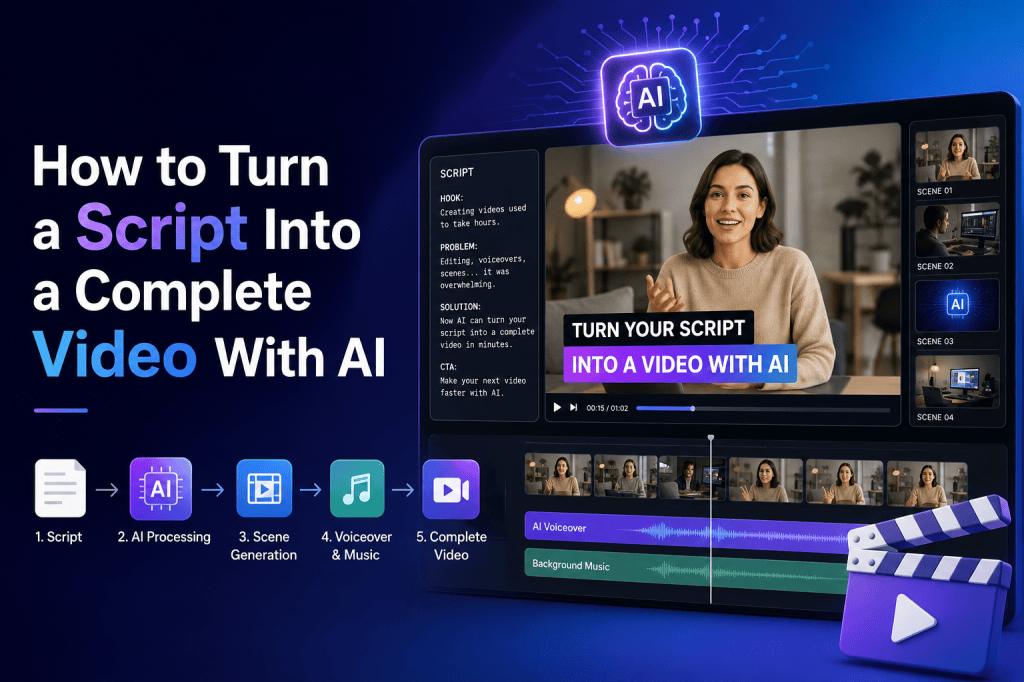
Turning a written script into a complete video used to require multiple tools, technical skills, and hours of manual editing. You needed to write the script, record a voiceover, find footage, create visuals, add captions, edit scenes, and finally export the video.
Today, AI video generators can automate much of this workflow. With the right script and a clear creative direction, AI can help transform text into scenes, generate or select visuals, create voiceovers, add subtitles, and assemble a finished video.
Whether you are creating AI video ads, UGC-style videos, social media content, product explainers, or educational videos, a script-to-video workflow can significantly reduce production time.
In this guide, you will learn how to turn a script into a complete video with AI, what information to include in your script, how AI handles each production stage, and how to improve the final result.
What Is Script-to-Video AI?
Script-to-video AI is a workflow that uses artificial intelligence to transform written content into a finished or partially finished video.
Instead of manually building every scene, you provide a script describing what should happen. AI can then interpret the script and help generate:
- Video scenes
- AI-generated visuals
- Voiceovers
- Background music
- Captions and subtitles
- Scene transitions
- Product shots
- AI avatars
- UGC-style presentations
- Calls to action
The exact capabilities depend on the AI video platform, but the basic concept is simple:
Script → Scenes → Voice → Visuals → Editing → Complete Video
This makes script-to-video technology especially useful for marketers, creators, agencies, ecommerce brands, and businesses that need to produce video content quickly.
Why Turn a Script Into a Video With AI?
Traditional video production can involve writers, actors, cameras, editors, voice artists, and designers. AI can reduce the number of manual steps involved.
1. Faster video production
AI can turn a prepared script into a video concept much faster than traditional production.
Instead of spending hours searching for footage and arranging scenes manually, AI can help generate a first version automatically.
2. Lower production costs
You may not need a camera crew, studio, professional voice actor, or physical production setup for every video.
This can make AI video production useful for businesses producing content at scale.
3. Easy content variations
Once you have one script, you can create multiple versions.
For example:
- Short-form version
- Long-form version
- Instagram Reel
- TikTok video
- YouTube Short
- Product ad
- UGC-style ad
- Explainer video
4. Easier experimentation
AI allows creators to experiment with different hooks, scenes, voices, and CTAs without restarting the entire production process.
This is particularly valuable for performance marketing.
What Do You Need Before Creating the Video?
Before giving your script to an AI video generator, prepare a few important elements.
1. A clear script
Your script should explain what the viewer needs to see, hear, and understand.
A weak script usually produces a weak video, even if the AI technology is excellent.
2. Target audience
Know who the video is for.
For example:
“This video is designed for ecommerce marketers looking to increase product conversions.”
This helps determine the tone, visuals, pacing, and messaging.
3. Video objective
Decide what the video needs to achieve.
Possible objectives include:
- Generate sales
- Explain a product
- Increase awareness
- Drive website traffic
- Educate viewers
- Generate leads
- Promote an offer
4. Visual direction
Give AI information about the desired visual style.
For example:
“Create a modern UGC-style video with natural lighting, handheld camera movement, and casual social-media pacing.”
The more specific your direction, the easier it becomes to produce consistent scenes.
How to Make One, Step by Step
Step 1: Start With Your Idea
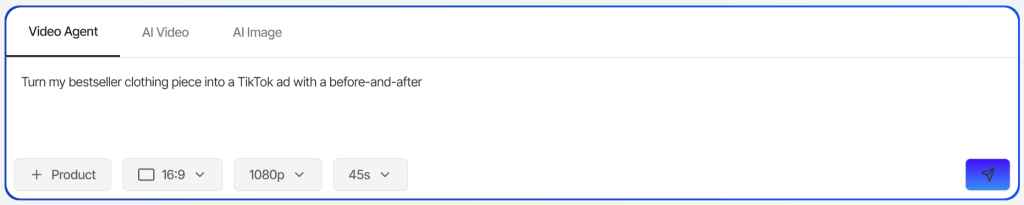
Open AI Video Agent 2.0 and type what you want in plain language. Something like “Turn my bestseller into a TikTok-style UGC video” is enough to start. Don’t write a script, the Agent’s built to work from a rough idea, not a finished brief.
Step 2: Add Your Product
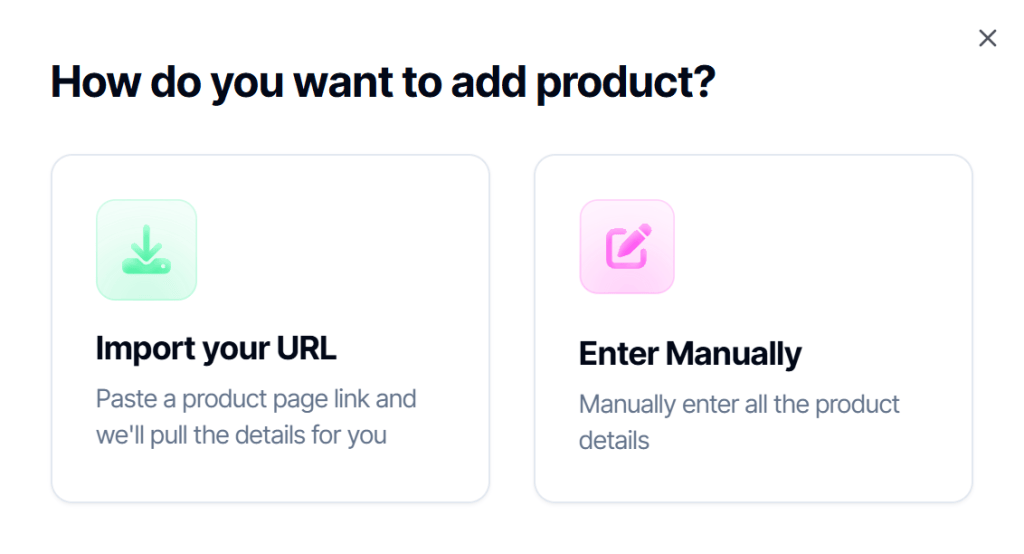
Paste a product URL, and the Agent pulls in the description and images automatically, or fill it in manually if you don’t have a link. Either way, this is what grounds the video in your actual product instead of something generic.

Step 3: Set the Format
Pick your aspect ratio and resolution, then set your length, anywhere from 4 seconds up to a full 60, one of the biggest additions in 2.0. For UGC specifically, don’t default to the shortest option out of habit, real UGC often runs long enough to build a little context before the payoff: a problem, then the product, then the reaction. A model is pre-selected for you, but you can change it if you want.

Step 4: Answer the Follow-Ups
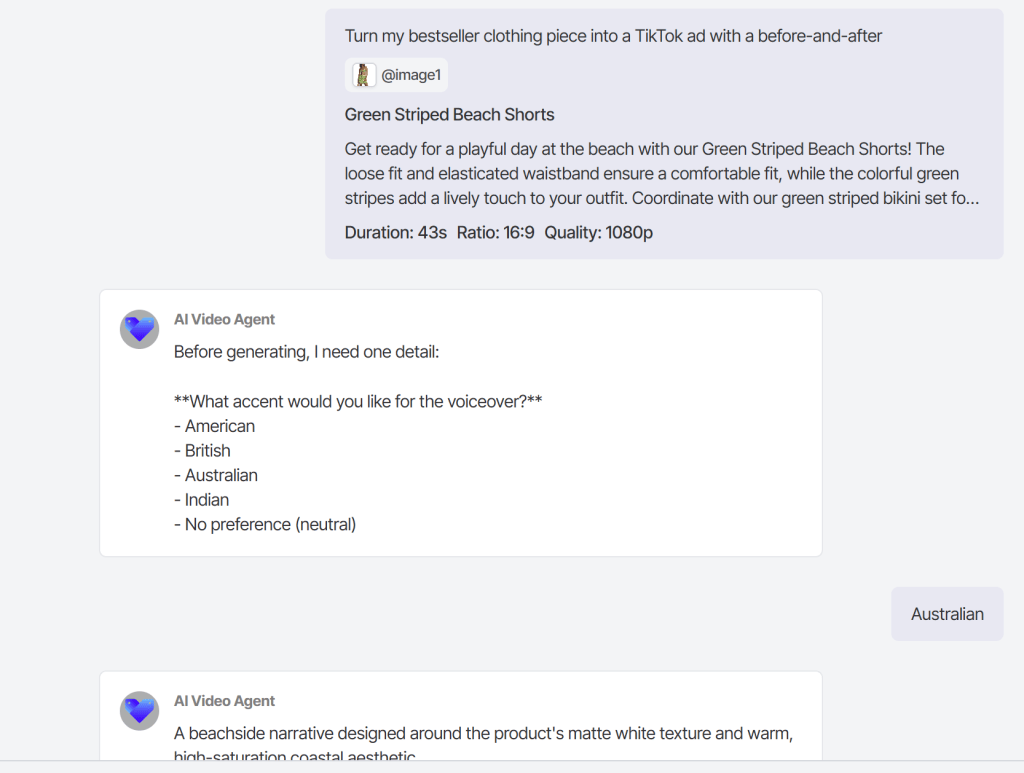
The Agent will ask about your audience, tone, and message before it builds anything. This step matters more than it looks. Answer like you’re describing the video to a friend, not writing marketing copy, the more natural your answers, the more the output sounds like something a real person would post.
Step 5: Review the Storyboard
This part is new in 2.0. Before anything renders, you’ll see the full plan, scene by scene. This is where you catch anything that reads as too polished or too “ad-like.” If a scene feels off, say so directly: “make this feel more casual” or “cut the product shot in scene 2, keep it just talking,” and that scene updates without touching the rest.
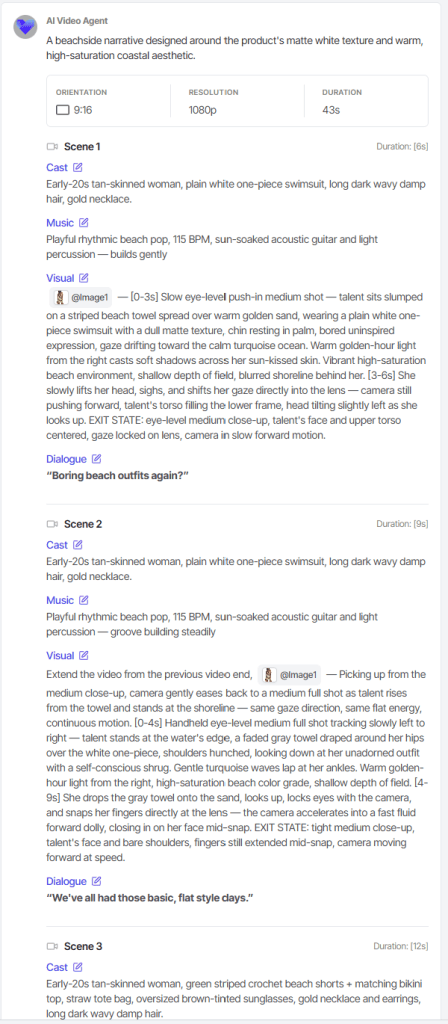
Step 6: Generate and Fine-Tune
Once the storyboard looks right, generate the video. If one scene still isn’t landing after you see it in motion, you can regenerate just that piece rather than starting over.
Step 7: Download and Post
Export and publish wherever your audience actually is: TikTok, Reels, YouTube Shorts. No further editing required, but nothing stopping you from tweaking it later either.
Example: Turning a Marketing Script Into an AI Video
Suppose your script says:
“Creating product videos doesn’t have to take days. With AI, you can start with a simple script, generate scenes, add a realistic voiceover, and turn everything into a finished video.”
You can transform it into a five-scene video.
| Scene | Script | Visual |
| 1 | Creating product videos doesn’t have to take days. | Marketer looking at a complicated editing timeline |
| 2 | With AI, you can start with a simple script. | Script appearing on screen |
| 3 | Generate scenes automatically. | Multiple video scenes being created |
| 4 | Add a realistic voiceover. | AI voice waveform and presenter |
| 5 | Turn everything into a finished video. | Completed video playing on smartphone |
This approach gives AI a clear production structure.
How to Write Scripts That Work Better With AI Video
Not every script is ideal for AI video generation.
Follow these principles.
Keep sentences conversational
AI-generated voices generally sound more natural when the script resembles real speech.
Instead of:
“The implementation of artificial intelligence facilitates significant optimization of video production processes.”
Use:
“AI can make video production much faster.”
Simple language is easier to understand and often sounds more natural.
Write for the viewer
Don’t simply describe your product.
Focus on the viewer’s problem.
Instead of:
“Our platform includes advanced AI technology.”
Try:
“You can turn your script into a finished video without starting from scratch.”
The second version communicates a direct benefit.
Include visual cues
If an important action should appear on screen, mention it in the production instructions.
For example:
Visual: Close-up of the product being used.
Voiceover: “Here’s how it works.”
This helps align the visual story with the narration.
Script-to-Video AI for UGC-Style Videos
One of the most useful applications of script-to-video AI is creating AI UGC videos.
Traditional UGC requires finding creators, sending products, waiting for filming, reviewing footage, and requesting revisions.
AI can simplify this workflow.
A UGC-style script might follow this structure:
Hook
“I honestly didn’t think this would make such a difference.”
Problem
“I was spending way too much time creating videos for my campaigns.”
Discovery
“Then I started using an AI video workflow.”
Demonstration
“I simply added my script and product information.”
Result
“Now I can create multiple video variations much faster.”
CTA
“If you’re creating ads, it’s worth trying.”
The AI can then help turn each section into a presenter-led video.
This is particularly useful for testing different advertising hooks and creative concepts.
How to Turn a Product Page Into a Video Script
AI can also help when you don’t have a complete script.
Start with your product information.
For example:
Product: Skincare serum
Benefits:
- Lightweight formula
- Easy daily application
- Designed for everyday skincare
AI can convert this information into a video structure:
Hook:
“Looking for a simpler skincare routine?”
Problem:
“Many routines involve too many products and too many steps.”
Solution:
“This lightweight serum is designed for easy everyday use.”
Benefits:
“Simple application, lightweight feel, and an easy addition to your routine.”
CTA:
“Discover the product today.”
This workflow can turn product information into a video concept much faster.
Common Mistakes When Using AI for Script-to-Video
1. Using vague prompts
“Make a professional video” isn’t enough.
Tell AI what the audience, style, setting, camera movement, mood, and subject should be.
2. Making every scene look different
Consistency matters.
If the same person appears throughout the video, maintain consistent:
- Appearance
- Clothing
- Environment
- Lighting
- Product
- Visual style
3. Overloading scenes
Don’t try to communicate five ideas in one scene.
One scene should generally have one primary visual idea.
4. Ignoring the first three seconds
Your opening determines whether many viewers continue watching.
Spend extra time improving the hook.
5. Letting AI do everything without reviewing
AI-generated videos can contain visual inconsistencies, awkward movements, incorrect text, pronunciation issues, or unnatural transitions.
Always review the final video.
How to Improve AI-Generated Video Quality
After generating the first version, treat it as a draft.
Review the video from the viewer’s perspective.
Ask:
Does the hook immediately explain why I should watch?
Do the visuals match the narration?
Does the video move quickly enough?
Is the voice natural?
Are captions readable?
Is the product shown clearly?
Is the CTA obvious?
Does the video feel consistent with the brand?
If the answer to any of these questions is no, revise that section rather than regenerating the entire video.
AI Video Production Workflow
A practical workflow looks like this:
1. Write the idea
↓
2. Create the script
↓
3. Break the script into scenes
↓
4. Add visual instructions
↓
5. Generate video scenes
↓
6. Generate voiceover
↓
7. Synchronize audio and visuals
↓
8. Add captions
↓
9. Add music and sound effects
↓
10. Apply branding
↓
11. Add CTA
↓
12. Review and export
This workflow can be adapted for almost any type of video.
Best Use Cases for Script-to-Video AI
Script-to-video AI is useful for many types of content.
Social media videos
Create short-form videos for platforms such as Instagram, TikTok, YouTube Shorts, and other vertical-video channels.
AI video ads
Create multiple advertising concepts from different scripts and hooks.
Product videos
Turn product descriptions and benefits into engaging demonstrations.
Educational content
Convert written lessons and explanations into narrated videos.
Explainer videos
Explain complicated products or services using AI-generated scenes and narration.
UGC-style content
Create creator-style videos without traditional filming.
Training videos
Turn internal documentation and educational scripts into video lessons.
Frequently Asked Questions
Can AI turn a written script into a complete video?
Yes. AI video workflows can transform a script into scenes and combine visuals, voiceover, captions, music, and other elements. The amount of automation depends on the platform and workflow you use.
Can I create an AI video without a camera?
Yes. Many AI video workflows don’t require traditional filming. You can use AI-generated scenes, avatars, synthetic voiceovers, product images, or other digital assets.
Can AI create videos from a short script?
Yes. Short scripts can work particularly well for social media videos, ads, and short-form content. The key is to provide enough information about the intended visuals and style.
Can AI create UGC-style videos from scripts?
Yes. AI presenters and avatar-based workflows can deliver scripts in a creator-style format. You can also combine generated presenters with product visuals and demonstrations.
How long should an AI video script be?
It depends on the video format. For short-form videos, concise scripts are generally more effective. Longer educational, promotional, or explainer videos can use more detailed scripts and multiple scenes.
Is AI video production completely automatic?
Not always. AI can automate many production tasks, but human review remains important. You should check the script, visuals, voiceover, timing, captions, branding, and final output before publishing.
Final Thoughts
Learning how to turn a script into a complete video with AI can dramatically simplify the video production process. Instead of managing every production step separately, you can use AI to connect scripting, scene generation, voiceover, captions, editing, and branding into a streamlined workflow.
The most important factor isn’t simply the AI model you use. Your script, visual direction, and creative strategy matter just as much.
Start with a strong hook, divide your script into clear scenes, describe the visuals you want, generate your voiceover, synchronize the scenes, add captions and branding, and finish with a clear CTA.
For marketers and creators, this approach makes it possible to produce more video variations, test different creative ideas, and create content faster without relying on a traditional production setup.
The future of video creation is moving toward a simple workflow:
Write the idea → Give AI the script → Generate the scenes → Refine the result → Publish.
And as AI video technology continues to improve, turning a simple script into a polished, complete video will become an increasingly accessible part of everyday content creation.
 AI UGC Video Generator
Leave a comment