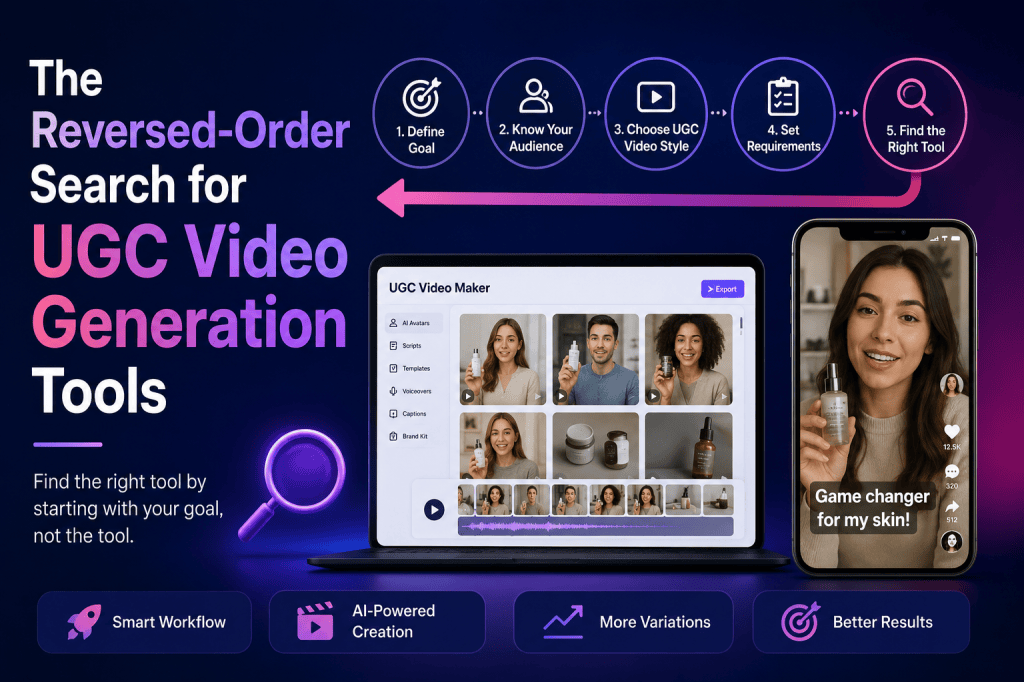
Finding the right UGC Video maker can feel surprisingly difficult.
There are dozens of AI video platforms promising faster production, realistic avatars, automated scripts, voiceovers, templates, and social-ready videos. At first glance, many of them appear to offer the same thing. But once you start creating actual UGC-style ads, the differences become much more obvious.
One platform might produce realistic presenters but offer limited creative control. Another may provide excellent templates but make it difficult to create multiple variations. Some tools are designed primarily for general video production, while others are specifically built around short-form advertising.
This creates a common problem: marketers often search for a tool first and figure out their requirements afterward.
A better approach is to reverse the search process.
Instead of asking, “Which UGC Video maker should I use?”, start with:
What kind of UGC videos do I need to create, how many do I need, where will I use them, and what does my production workflow look like?
Once those questions are answered, choosing the right tool becomes much easier.
This article explores the reversed-order search for UGC video generation tools, including what to evaluate, how to compare platforms, and how to choose a solution that fits your marketing workflow.
What Is a UGC Video Maker?
A UGC Video maker is a tool that helps businesses create user-generated-content-style videos without relying entirely on traditional filming and creator production.
UGC-style videos typically look more natural and conversational than traditional advertisements. They may feature a person explaining a product, demonstrating how it works, sharing an experience, or recommending it to viewers.
AI-powered UGC Video makers can automate parts of this process by combining technologies such as:
- AI-generated presenters or avatars
- Script generation
- AI voiceovers
- Product visuals
- Automated video editing
- Captions and subtitles
- Social media formats
- Multiple creative variations
The goal isn’t necessarily to recreate every detail of authentic customer content. Instead, the goal is to create videos that feel native to the platforms where people consume short-form content.
For marketers, this can significantly reduce the time between having a product idea and launching a video creative.
Why Search for UGC Tools in Reverse?
Traditional tool research usually looks something like this:
Tool → Features → Pricing → Use case
You find a platform, look at its features, check the price, and then try to figure out whether it fits your campaign.
The reversed approach changes the order:
Campaign → Creative requirements → Production workflow → Volume → Budget → Tool
This difference is important.
Imagine you’re running paid social campaigns for an eCommerce product. You don’t necessarily need the platform with the most AI features.
You may need a tool that can generate:
- 20 videos per month
- Multiple hooks per product
- Different presenters
- Short vertical videos
- Product-focused scripts
- Fast revisions
- Multiple CTA variations
A platform that excels at cinematic videos may be less useful than a simpler UGC Video maker built around rapid creative testing.
The best tool is therefore not necessarily the one with the longest feature list.
It’s the one that solves your specific production problem.
Step 1: Start With the Campaign, Not the Tool
Before searching for a UGC Video maker, define the campaign.
Ask yourself:
What is this video supposed to accomplish?
Different objectives require different creative structures.
For example:
| Campaign Goal | Recommended UGC Video Style |
| Product awareness | Personal introduction or product discovery |
| Direct sales | Problem-solution UGC ad |
| Product education | Demonstration or explainer |
| Retargeting | Testimonial or objection-handling video |
| App promotion | Screen-recording + presenter |
| New product launch | First-impression style video |
| Feature promotion | Product walkthrough |
| Social engagement | Conversational or opinion-led content |
A product awareness campaign may benefit from a simple “I just discovered this” concept.
A conversion campaign may need a stronger hook, product demonstration, social proof, and CTA.
This is why starting with the campaign gives you a much better foundation for selecting a tool.
Step 2: Define Your UGC Video Format
The phrase “UGC video” covers many different formats.
You might want:
Talking-Head Videos
A presenter speaks directly to the camera and explains the product.
These are useful for:
- Product recommendations
- Testimonials
- Educational content
- Problem-solution ads
Product Demonstrations
The video focuses on showing how a product works.
These are particularly useful for eCommerce brands because viewers can quickly understand the product’s functionality.
Testimonial-Style Videos
These are structured around a customer-style experience.
For example:
“I didn’t expect this to work, but after using it for two weeks…”
The format creates a narrative rather than simply listing product features.
Problem-Solution Videos
These start with a recognizable problem and introduce the product as the solution.
This format is particularly common in paid social advertising.
Product Review Videos
These mimic the style of creator reviews and can be useful when the goal is to explain benefits, features, and use cases.
Once you’ve identified your desired format, you can eliminate many tools that don’t support it effectively.
Step 3: Evaluate the AI Presenter Quality
If you’re using an AI-powered UGC Video maker, presenter quality matters.
A technically impressive video can still fail if the presenter feels unnatural.
Look for:
- Natural facial expressions
- Realistic lip synchronization
- Appropriate gestures
- Natural voice delivery
- Conversational pacing
- Different presenter options
- Consistent appearance
However, realism isn’t the only factor.
The presenter should also match your target audience and campaign.
For example, a beauty brand may want a different presentation style from a B2B software company.
The best UGC videos don’t simply look realistic. They feel appropriate for the message and audience.
Step 4: Look at Script Generation and Editing
A good UGC Video maker should make it easy to turn an idea into a usable script.
Instead of starting with:
“Create a video about my product,”
you should be able to develop a specific creative angle.
For example:
Hook:
“I wish I had discovered this before spending hundreds on alternatives.”
Problem:
“Most products in this category looked good but were difficult to use.”
Solution:
“Then I tried this…”
CTA:
“Check it out and see whether it works for you.”
The ability to create multiple script variations is especially valuable for advertising.
You might create:
- 5 different hooks
- 3 problem statements
- 3 product benefits
- 2 CTAs
That creates dozens of possible combinations.
This is where AI video generation becomes particularly powerful for performance marketing.
Step 5: Consider Creative Testing
One of the biggest reasons brands use AI UGC tools is creative volume.
Traditional production can make every variation expensive.
With an AI workflow, you can test more concepts without starting from zero every time.
A basic testing framework could look like this:
| Variable | Examples |
| Hook | Curiosity, problem, benefit, testimonial |
| Presenter | Different ages, styles, appearances |
| Script | Educational, emotional, direct |
| Product angle | Price, quality, convenience |
| CTA | Shop now, learn more, try it |
| Length | 15 sec, 30 sec, 45 sec |
| Format | Review, demo, testimonial |
Instead of asking, “Can this tool make a UGC video?”
Ask:
Can this tool help me generate and test enough variations to improve my campaign?
That’s a much more useful question.
Step 6: Check Platform Compatibility
Your UGC videos may be used across multiple channels.
A good UGC Video maker should make it easy to produce content for platforms such as:
- TikTok
- Instagram Reels
- YouTube Shorts
- Meta Ads
- Landing pages
- Product pages
Vertical video is particularly important for short-form social advertising.
You should also check whether the platform supports:
- 9:16 video
- Captions
- Text overlays
- Branding
- Different video lengths
- High-resolution exports
A video that looks good inside the editor isn’t necessarily ready for every advertising placement.
Step 7: Don’t Ignore Product Integration
For eCommerce brands, product integration can be more important than avatar quality.
A UGC video should make the product easy to understand.
Look for workflows that allow you to incorporate:
- Product images
- Product pages
- Product descriptions
- Brand assets
- Logos
- Product benefits
- Existing marketing copy
The easier it is to move product information into the video creation process, the faster your production workflow becomes.
This is particularly valuable for brands managing large product catalogs.
Step 8: Compare UGC Video Makers by Workflow
Feature comparison alone can be misleading.
Two tools may both advertise AI avatars, but the actual workflows can be completely different.
Consider this comparison framework:
| Factor | Basic UGC Tool | Advanced UGC Video Maker |
| AI presenters | Limited selection | Multiple presenter options |
| Script creation | Basic | AI-assisted variations |
| Product integration | Manual | Streamlined |
| Creative variations | Limited | Designed for testing |
| Captions | Basic | Customizable |
| Branding | Basic | Brand-focused |
| Social formats | Standard | Multiple formats |
| Ad workflow | General | Performance-focused |
| Production scale | Low | High |
| Best for | Occasional videos | Continuous campaigns |
This doesn’t mean the advanced option is always better.
If you only create two videos a month, you may not need an advanced production workflow.
But if you’re launching dozens of creatives every month, scalability becomes critical.
Step 9: Think About Pricing Differently
Pricing is another area where marketers often search in the wrong order.
Instead of asking:
“Which UGC Video maker is cheapest?”
ask:
“What will each usable video cost me?”
A $20 tool that produces videos you cannot use may be more expensive than a $50 tool that produces campaign-ready creatives.
Consider:
- Monthly subscription
- Video generation limits
- Export limits
- AI credits
- Premium presenters
- Voice options
- Commercial usage
- Watermarks
- Editing limitations
Then calculate your expected production volume.
For example:
If you’re creating 30 videos each month, compare the effective cost per usable creative rather than simply comparing subscription prices.
Step 10: Test Before You Commit
If possible, create the same test video using several tools.
Give each platform the same:
- Product description
- Script
- Creative angle
- Target audience
- CTA
- Product image
Then compare the results.
Evaluate:
- Presenter realism
- Voice quality
- Lip synchronization
- Script quality
- Editing
- Product visibility
- Caption quality
- Brand consistency
- Production speed
- Overall usability
This gives you a much more realistic comparison than reading feature pages.
The Reversed-Order UGC Tool Selection Framework
Here’s a simple framework you can use before choosing any UGC Video maker.
1. Define the goal
What should the video accomplish?
2. Define the audience
Who needs to watch it?
3. Choose the creative format
Review, testimonial, demo, explainer, or problem-solution?
4. Define production volume
Do you need 5 videos or 100?
5. Identify required variations
Will you test hooks, presenters, scripts, CTAs, or all of them?
6. Determine distribution channels
TikTok, Instagram, Meta Ads, YouTube Shorts, website, or multiple channels?
7. Set your budget
Determine the acceptable monthly and per-video cost.
8. Test platforms
Create the same creative across your shortlisted tools.
9. Measure output quality
Don’t judge based only on how impressive the editor looks.
10. Choose the workflow that scales
The winning tool should make your future campaigns easier, not just your first video.
Common Mistakes When Choosing a UGC Video Maker
Choosing Based Only on Price
The cheapest tool isn’t automatically the best option.
A low subscription price may come with limits that make large-scale production difficult.
Prioritizing Avatar Realism Over Everything Else
A realistic presenter is useful, but the script, hook, pacing, product presentation, and CTA can have a much bigger impact on advertising performance.
Ignoring Creative Volume
If you’re running paid campaigns, one video is rarely enough.
Your workflow should support ongoing creative testing.
Forgetting About Editing
AI-generated footage may still require adjustments.
Check whether the platform makes it easy to edit captions, scenes, text, voiceovers, and CTAs.
Choosing a Tool Before Defining the Campaign
This is the biggest mistake the reversed-order method is designed to solve.
Start with the outcome.
Then work backward toward the tool.
Frequently Asked Questions
What is a UGC Video maker?
A UGC Video maker is a platform that helps brands create user-generated-content-style videos using AI, templates, avatars, voiceovers, scripts, and automated editing. These tools can reduce the time and resources required to produce short-form marketing videos.
Are AI UGC videos suitable for paid advertising?
Yes. AI-generated UGC-style videos can be used as advertising creatives when they meet the relevant platform requirements and applicable advertising and disclosure rules. Brands should also ensure that claims, testimonials, and representations are accurate.
What should I look for in a UGC Video maker?
Focus on presenter quality, script generation, creative variation, product integration, editing controls, social formats, pricing, export quality, and scalability.
Is an AI UGC Video maker better than hiring creators?
It depends on your goals. Creator-generated content can provide genuine personal experiences and authentic customer perspectives. AI tools can offer speed, scalability, and easier creative iteration. Many marketing teams can benefit from using both approaches.
How many UGC videos should I create?
There is no universal number. For paid advertising, creating multiple concepts and variations can provide more opportunities for testing. Your ideal volume depends on your budget, campaign size, product catalog, and testing strategy.
Can AI UGC videos look realistic?
Modern AI video generation can create increasingly realistic presenters, voices, and scenes. However, realism varies by platform and generation. The quality of the script, voice delivery, facial expressions, editing, and product integration also affects how authentic the final video feels.
Is Tagshop AI a UGC Video maker?
Yes. Tagshop AI is positioned as an AI UGC Video maker for creating UGC-style video ads. It is particularly relevant for brands and marketers looking to produce product-focused social advertising creatives at scale.
What is the reversed-order search method?
The reversed-order method means starting with your marketing objective and production requirements instead of starting with a software tool. You define your campaign, audience, video format, production volume, channels, and budget first, and then select the UGC Video maker that fits those requirements.
Final Thoughts
Choosing an UGC Video maker doesn’t have to start with a list of software features.
Start with the campaign.
Understand what you’re trying to accomplish, determine what type of UGC content you need, estimate how many variations you’ll create, and identify where those videos will be published.
Then work backward.
This reversed-order approach helps you avoid choosing a platform simply because it has impressive AI features or a low monthly price. Instead, you’re selecting a tool because it fits the way your marketing team actually creates, tests, and scales video content.
For brands running continuous paid social campaigns, the biggest advantage of an AI UGC workflow isn’t simply making one video faster. It’s being able to turn one product idea into multiple creative concepts, test them, learn from the results, and keep producing new variations.
That’s ultimately what makes the right UGC Video maker valuable: not just video generation, but a repeatable creative production system.


Leave a Reply