The most interesting thing about Gemini Omni Flash isn’t that it can generate video.
It’s that it understands far more than video.
For years, AI models have been split into categories. One model writes. Another generates images. A third creates video. If you wanted them to work together, you had to stitch the workflow together yourself.
Gemini Omni Flash is Google’s attempt to collapse those boundaries.
Introduced as the first model in the new Gemini Omni family, Gemini Omni Flash can take text, images, audio, and video as inputs and generate video outputs while allowing conversational editing throughout the process. Instead of treating creation as a sequence of disconnected tools, Google is trying to turn it into a single multimodal workflow.
That shift is why creators, marketers, and AI enthusiasts are paying attention.
If you’ve ever wanted to turn a product image into an ad, modify an existing video through conversation, or combine multiple media types into one creative workflow, Gemini Omni Flash is designed for exactly that type of task.
In this guide, we’ll break down what Gemini Omni Flash is, how it works, where it performs well, where it still struggles, and how you can use it through Tagshop AI for real-world content creation workflows.
What is Gemini Omni Flash?
Gemini Omni Flash is Google’s latest multimodal generation model developed by Google DeepMind. It serves as the first release in the broader Gemini Omni family, a new generation of AI systems designed to create content from virtually any combination of inputs.
Unlike traditional AI video generators that primarily rely on text prompts, Gemini Omni Flash can understand and combine text, images, audio, and existing video clips before generating a final video output. The model also supports conversational editing, allowing users to refine scenes, change elements, adjust visuals, and continue editing through natural language instructions.
A useful way to think about it is this:
Most AI video models behave like generators.
Gemini Omni Flash behaves more like an editor-director.
Instead of generating a clip and forcing you to start over when something is wrong, it encourages an iterative workflow where creation and editing happen inside the same conversation.
Quick specifications
| Category | Details |
| Developer | Google DeepMind |
| Model Type | Multimodal video generation and editing model |
| Input Types | Text, images, audio, video |
| Output Types | AI-generated video |
| Audio Support | Native audio generation |
| Video Length | Up to 10 seconds |
| Key Strength | Conversational multimodal video creation |
| Availability | Gemini App, Google Flow, YouTube integrations, Tagshop AI workflows |
Why Gemini Omni Flash matters
Most AI launches generate excitement for a few days and then quietly disappear from actual workflows.
Gemini Omni Flash feels different because it addresses a real friction point.
Creating AI video has become easier over the past two years. Editing AI video is still frustrating.
Many tools produce impressive clips but fall apart when you want to modify them. Change a character and the entire scene shifts. Adjust the background and facial details change. Extend a sequence and consistency disappears.
Google’s answer is conversational editing.
The model allows creators to modify generated videos through follow-up instructions while maintaining context from previous generations. That’s a practical improvement, not just a technical one.
For marketers, it means faster creative iteration.
For creators, it means fewer complete regenerations.
For brands, it means lower production costs when testing concepts.
And for the AI industry, it signals a move toward unified creative systems rather than isolated generation tools.
Key features of Gemini Omni Flash
Multimodal understanding
Gemini Omni Flash was built around the idea that creative work rarely starts from a single input.
A marketer may have product images.
A creator may have a voice note.
A brand may already have existing video footage.
Instead of forcing everything into a text prompt, the model accepts multiple media formats simultaneously and understands the relationship between them.
Native audio generation
Audio is where many AI videos still feel artificial.
Gemini Omni Flash includes native audio generation, allowing sound and visuals to be created together rather than assembled afterward.
That doesn’t eliminate the need for professional editing in every case, but it creates a more coherent output than workflows that rely on separate tools for sound and video.
Conversational editing
This is arguably the feature that matters most.
You can generate a scene, review it, and then continue refining it through follow-up instructions.
Want a different camera angle?
Ask.
Need a different background?
Ask.
Want to change the mood from energetic to cinematic?
Ask.
The workflow feels closer to collaborating with an editor than repeatedly generating from scratch.
Better scene consistency
Consistency remains one of the hardest problems in AI video.
Gemini Omni Flash isn’t perfect, but Google’s focus on world understanding and multimodal reasoning helps maintain stronger continuity than many earlier-generation systems.
Built for iterative creative work
Many AI tools optimize for impressive demos.
Gemini Omni Flash appears optimized for actual workflows.
That distinction matters.
Creating a beautiful clip once is easy.
Creating twenty variations for a campaign is harder.
The model’s conversational approach makes iteration significantly more practical.
How to use Gemini Omni Flash on Tagshop AI
You don’t need a Google Cloud account, an API key, or any technical setup to use Gemini Omni Flash. Everything is available directly inside Tagshop AI’s Assets Generator.
Step 1 – Open Tagshop AI
Go to Tagshop AI → Assets Generator → Choose Model → Select Gemini Omni Flash.
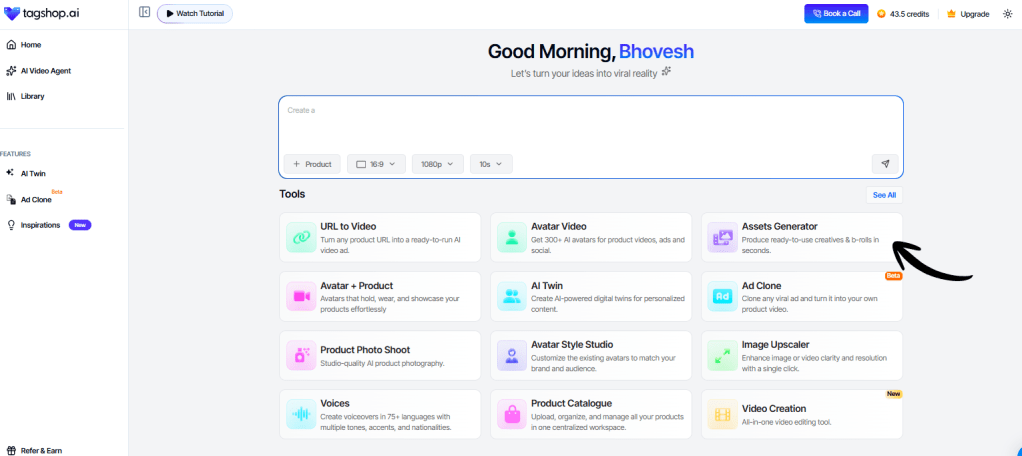
Unlike traditional AI models that require separate tools for different tasks, Gemini Omni Flash is designed to handle text and image inputs within a single workflow. There are no complicated settings or multiple model versions to choose from.
Step 2 – Add Your Input Type
Start by providing the content you want Gemini Omni Flash to work with.
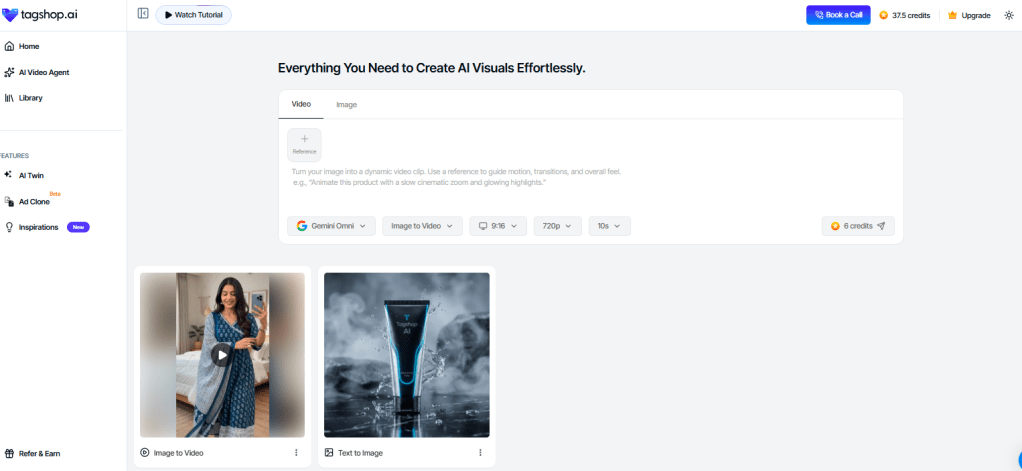
You can:
- Enter a text prompt describing the scene, style, mood, or creative direction.
- Upload a product image.
- Combine multiple inputs together.
For example, you can upload:
- A product image for the subject.
- A style image for color grading.
- A voice sample for creative context.
Gemini Omni Flash analyzes all these inputs simultaneously, enabling it to understand the complete creative vision rather than focusing on a single reference source.
Step 3 – Set Your Output
Choose the format that matches your publishing destination.

Available aspect ratios include:
- 9:16 for TikTok, Instagram Reels, and YouTube Shorts.
- 1:1 for Facebook and Instagram Feed posts.
- 16:9 for YouTube videos and wider campaign assets.
Video generations can run up to 10 seconds per output, making it ideal for short-form advertising and social media content.
Step 4 – Generate, Refine, and Export
Click Generate and let Gemini Omni Flash create your content.
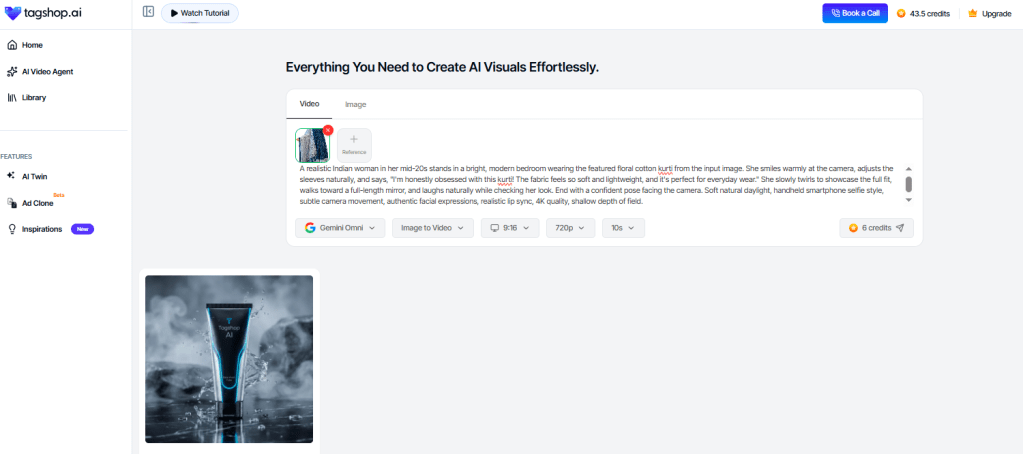
Most outputs are ready within 5–15 minutes depending on complexity.
One of the biggest advantages of Gemini Omni Flash is iterative editing. If you’d like to make changes, you don’t need to start from scratch. Simply type instructions such as:
- “Make the scene brighter.”
- “Change the background to a beach.”
- “Add more dramatic lighting.”
- “Make the product larger.”
The model updates the existing generation instead of rebuilding the entire project.
Once you’re happy with the result, export your asset or publish it directly to platforms like Meta and TikTok.
Real-world use cases
A lot of AI blog posts list use cases that nobody actually needs.
Let’s focus on the ones that matter.
Content creation
Writers spend more time gathering context than writing.
Gemini Omni Flash can process documents, images, screenshots, videos, and research materials simultaneously.
That makes it particularly useful for creating first drafts, content briefs, and research-backed articles.
The output still needs editing.
But the research phase becomes dramatically faster.
Marketing workflows
Marketers rarely work with text alone.
Campaigns involve creative assets, screenshots, ad copy, customer feedback, landing pages, and analytics.
Gemini Omni Flash can process all of that context together.
That’s a meaningful improvement over models that primarily focus on text interactions.
Ecommerce operations
Imagine uploading product images, customer reviews, competitor listings, and brand guidelines into a single workflow.
The model can help generate product descriptions, marketing angles, ad concepts, and content ideas without forcing teams to manually combine information.
For ecommerce teams, that’s where the value starts to become obvious.
Research and analysis
Large-context models shine when information becomes messy.
Researchers, analysts, and consultants often spend hours connecting information from different sources.
Gemini Omni Flash reduces that friction.
It’s not a replacement for human judgment.
It’s a force multiplier for it.
Customer support
Support teams increasingly deal with screenshots, recordings, documentation, and written conversations.
A multimodal model can understand all of those inputs together.
That creates opportunities for faster ticket analysis and better customer assistance workflows.
Creative production
This is where Google’s long-term vision becomes interesting.
The ability to understand text, audio, images, and video inside the same system opens possibilities for collaborative creative workflows that weren’t practical before.
We’re still early.
But the direction is clear.
Gemini Omni Flash vs competing AI models
The obvious question is whether Gemini Omni Flash is actually better than alternatives.
The answer depends on what you’re doing.
| Category | Gemini Omni Flash | GPT | Claude | Gemini Pro |
| Speed | Excellent | Very Good | Good | Good |
| Multimodal Inputs | Excellent | Strong | Moderate | Strong |
| Long Context | Excellent | Strong | Excellent | Strong |
| Reasoning | Strong | Excellent | Excellent | Strong |
| Creative Tasks | Strong | Strong | Moderate | Strong |
| Business Workflows | Excellent | Excellent | Excellent | Good |
| Cost Efficiency | Strong | Moderate | Moderate | Strong |
GPT still feels stronger for broad reasoning and complex agent-like tasks.
Claude often excels at writing, analysis, and long-form document work.
Gemini Omni Flash shines when multiple media formats enter the workflow.
That’s the distinction that matters.
If your work revolves around text alone, the gap narrows.
If your work involves documents, images, audio, and video together, Gemini Omni Flash becomes much more compelling.
Strengths and limitations
No serious review should pretend every model is perfect.
Gemini Omni Flash has clear advantages.
Its multimodal capabilities feel practical rather than experimental.
The speed is impressive.
The ability to understand different content formats inside one workflow removes friction.
For businesses, that translates directly into productivity gains.
But there are tradeoffs.
Like every modern AI model, it can still hallucinate.
Complex tasks occasionally require clarification.
Some outputs need human verification.
And depending on the use case, GPT or Claude may produce stronger reasoning or writing.
The right question isn’t whether Gemini Omni Flash is better than every competitor.
The right question is whether it’s the best fit for your workflow.
In many multimodal workflows, the answer is increasingly yes.
Expert tips for getting better results
The fastest way to improve output quality is simple:
Give the model better context.
Instead of asking:
“Analyze this.”
Try:
“Analyze this product image, customer review dataset, and landing page. Identify the three strongest marketing angles for a DTC skincare brand targeting women aged 25–40.”
Specificity matters.
Another tip is combining media formats.
Many users still treat multimodal models like text chatbots.
You’re leaving value on the table if you do that.
Upload images.
Provide videos.
Add screenshots.
Include voice notes.
The model becomes significantly more useful when it can see the same context that a human collaborator would see.
Finally, use iterative refinement.
The first answer is rarely the best answer.
The second and third rounds are where most of the value emerges.
Conclusion
Gemini Omni Flash isn’t trying to be another chatbot.
It’s Google’s attempt to build a model that understands how people actually work.
Most real-world projects involve more than text.
They involve images, documents, videos, screenshots, recordings, and conversations.
That’s exactly where Gemini Omni Flash feels strongest.
Will it replace every other model?
No.
GPT remains exceptional for reasoning.
Claude remains one of the best writing-focused AI systems available.
But when multiple forms of information need to come together inside a single workflow, Gemini Omni Flash starts making a very convincing case for itself.
For creators, marketers, ecommerce teams, researchers, and businesses, that’s what makes this model worth paying attention to.
Ready to explore what Gemini Omni Flash can do? Try it inside Tagshop AI and start building smarter AI-powered workflows today.


Leave a Reply